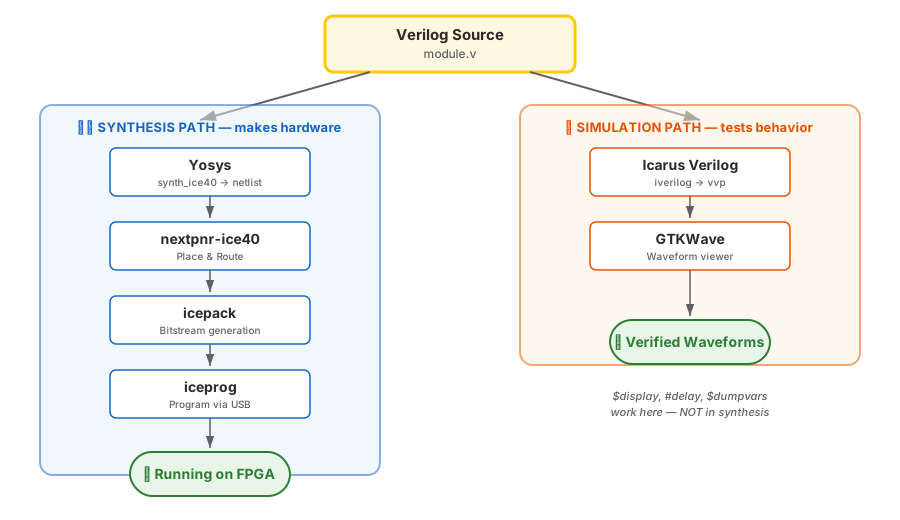
Rule: Design code uses only the synthesizable subset.
Testbench code can use everything.
The #10 Trap
// DANGER: this "works" in simulation...
always @(posedge clk) begin
    a <= 1'b1;
    #10;           // ← wait 10 time units
    a <= 1'b0;
end
Simulation:#10 pauses for 10 time units. It "works." Synthesis:#10 is silently ignored. The behavior is completely different. Result: Simulation passes, hardware fails. The worst kind of bug.
Never use #delay in synthesizable code. Not even "just for testing."
Your Day-to-Day Workflow
①Write your Verilog module
②Simulate it — does it behave correctly? (Icarus + GTKWave)
③Synthesize it — does it fit? Does timing pass? (Yosys + nextpnr)
④Program the FPGA — does it work on real hardware? (iceprog)
Always simulate first. Fixing bugs in simulation takes minutes.
Debugging on hardware takes hours.
Your First Testbench
Step ② says "simulate it." But simulate it against what?
A testbench is a separate Verilog module that:
① Has no ports — it's the top of the simulation world
②Instantiates your design (the "DUT" — Design Under Test)
③Drives inputs and checks outputs
④ Prints PASS / FAIL so you know immediately if something broke
You won't write testbenches from scratch until Week 2.
For now you just need to read and run the ones we provide.
Reading a Testbench
// tb_button_logic.v — tests your button_logic module
`timescale 1ns / 1ps            // ← time units for simulation

module tb_button_logic;          // ← no ports!
    reg  sw1, sw2, sw3, sw4;    // ← inputs you control
    wire led1, led2, led3, led4; // ← outputs to check

    button_logic dut (           // ← your design goes here
        .i_switch1(sw1), .i_switch2(sw2),
        .i_switch3(sw3), .i_switch4(sw4),
        .o_led1(led1), ...
    );

    initial begin
        $dumpfile("dump.vcd");   // ← record waveforms
        $dumpvars(0, tb_button_logic);

        sw1=0; sw2=1; sw3=0; sw4=1; // ← drive inputs
        #1;                          // ← wait for logic to settle
        if (led1 === 1'b0) ...       // ← check with ===
    end
endmodule
Notice: reg, initial, #1, $dumpfile — all sim-only constructs.
A testbench will never become hardware.
Running a Testbench
# From any lab exercise directory:
make sim       # compile + run → prints PASS/FAIL
make wave      # opens GTKWave to inspect waveforms
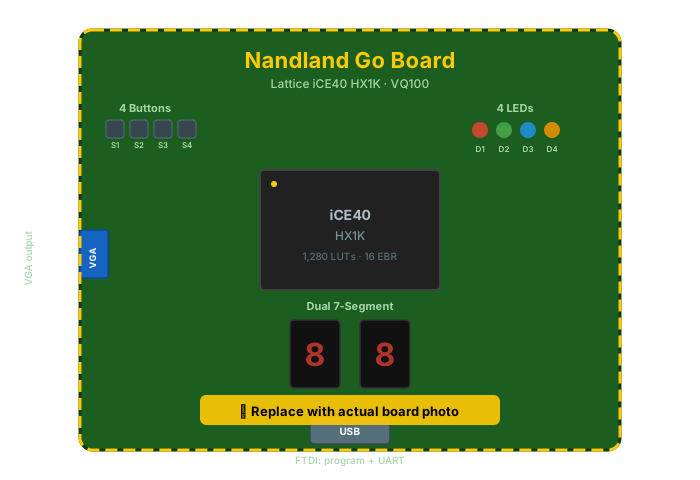
Everything you need: 4 LEDs, 4 buttons, dual 7-seg, VGA, UART via USB.
You'll get your board in class today.
🤖 Check the Machine
Ask an AI assistant:
“I have an initial block that uses $display
inside it. Will this affect my synthesized hardware?”
TASK
Ask about initial + $display in synthesis.
BEFORE
Your prediction: “$display is printing, so it must not synthesize — but initial might?”
AFTER
AI should explain: $display is ignored by synth; initial may set FF initial values on FPGAs (ignored on ASIC).
TAKEAWAY
Same source, two tools, different answers. Yosys strips sim-only constructs — verify with write_verilog.
Verify: Run yosys -p "read_verilog foo.v; synth_ice40; write_verilog synth_out.v"
and grep for $display — it's gone. That's the one-command proof
that synthesis ignores simulation directives.
Key Takeaways
①
Same source file → two paths: synthesis (hardware) and simulation (behavior).
②
Not all Verilog synthesizes. #delay, $display, initial are sim-only.
③
A testbench drives your design's inputs, checks its outputs, and prints PASS/FAIL.
④Always simulate first — make sim before make prog.
🔗 Transfer
Anatomy of a Module
Day 1, Video 3 of 4 · ~12 minutes
▸ WHY THIS MATTERS NEXT
You now know that Verilog is consumed by two different tools. Next up:
the structural shell every Verilog file lives inside — the
module declaration. Every FPGA, every ASIC, every IP
block in a modern SoC is made of modules. In Video 3 you'll write
your first one, and it'll be the template for every design you
write for the rest of this course.